Check Boxes and Due Dates on Paycheck Planner

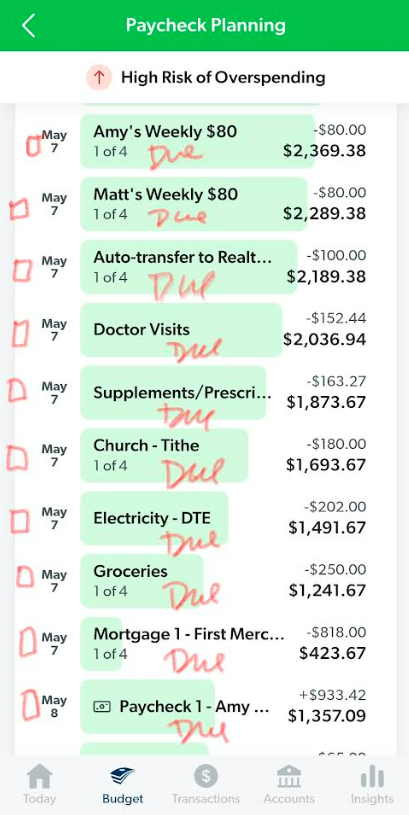
It would be so awesome if the Paycheck Planning portion of the phone app had checkboxes next to the budget items (see below), to be checked off once that item hits the checking account. It usually takes 2-4 days after a budget item hits my bank account before it shows up on E$. So because of that, I cannot swipe the transaction to the category to show it "paid" in my budget, until days after I paid it. If I could check it off on the Paycheck Planning tool as soon as I see it in my bank account, or even once I initiated the transaction to be paid, that would be so helpful. (Kind of like when I used to do a paper budget and I'd put a checkmark next to any item I paid, right when I paid it. Then I knew I was done with those items for the week.) Instead, I have to go from memory to make sure I paid it until I see it come up as a transaction to be categorized on the budget. Or I keep scrolling up and down for that week on the Paycheck Planning tool and trying to go from memory.
It would also be nice on the app if the due dates were under each item. I have to keep toggling back and forth to see the due dates in the budget, when I'm editing the bills to be paid with a certain paycheck.
-
Travis, I saw your comment on the other person's post. Is this idea being worked on? :)
1 -

Hi Amy,
All ideas posted in the community are under consideration. If or when it moves forward, we'll update this thread with a new status, such as Not Planned, Planned, or Completed.
1 -

I love the paycheck planner feature. This suggested change (specifically the check boxes) would bring it full circle. Today the solution is focused on planning… I'm actually using it to reconcile my bank account every day. Having checkmarks is a simple way to open paycheck planning up to a full new layer of functionality.
1 -
Thank you, Cameron! :)
1
Please sign in to leave a comment.
Comments
4 comments